

A Comprehensive Manual to Mounting Your TV at Home: Essential TV Wall Mounting Tips
Mounting a television on your wall transforms your living space, creating a sleek, modern aesthetic while freeing up valuable floor area. I have guided countless homeowners through this process, and I can assure you that a successful installation hinges on careful planning and precise execution. This comprehensive manual provides expert TV wall mounting tips to ensure your setup is both secure and visually stunning. From selecting the right hardware to concealing unsightly cables, I will walk you through every critical step of the TV installation process. Whether you are a seasoned DIY enthusiast or a first-time installer, this wall mount guide will equip you with the knowledge to achieve a professional-grade result. Let us begin by exploring the foundational decision that impacts every subsequent step: choosing the correct mount for your specific television and wall type.
Selecting the Right Wall Mount for Your TV
Choosing the appropriate wall mount is the single most important decision you will make during your TV installation. The market offers several distinct mount types, each designed to accommodate different viewing habits and room configurations. I always advise my clients to consider their primary use case before making a purchase. For a dedicated home theater where viewers sit directly opposite the screen, a fixed or low-profile mount is often the optimal choice. These mounts hold the television flush against the wall, typically just one to two inches away, creating an exceptionally clean, picture-frame appearance. However, if your living room serves multiple purposes, a tilting mount provides invaluable flexibility. Tilting mounts allow you to angle the screen downward, effectively eliminating glare from overhead lights or windows. I have found that a tilt of approximately 10 to 15 degrees is usually sufficient to combat most ambient light issues without distorting the viewing angle.
For rooms where seating is arranged in an L-shape or spans a wide area, a full-motion or articulating mount becomes essential. These sophisticated mounts extend from the wall and allow you to swivel, tilt, and pan the television to virtually any angle. I recommend full-motion mounts for corner installations or when you need to access the back of the TV for cable connections. The primary trade-off is that these mounts hold the television further from the wall, typically three to six inches, which can be less aesthetically pleasing when the TV is not in use. Regardless of the type you select, you must verify the mount’s compatibility with your television’s VESA (Video Electronics Standards Association) pattern. This standardized interface consists of four screw holes on the back of your TV, measured in millimeters. Common patterns include 200×200, 400×400, and 600×400 for larger screens. You can find this information in your television’s user manual or by measuring the horizontal and vertical distance between the mounting holes. I always stress that a mismatch here will render your mount completely unusable.
Beyond the mount style, you must consider weight capacity. A mount rated for a maximum load that barely exceeds your TV’s weight is a recipe for disaster. I recommend selecting a mount with a weight capacity at least 20 percent higher than your television’s actual weight. This safety margin accounts for the stress of movement if you choose an articulating mount and provides peace of mind. Finally, assess your wall composition. A mount designed for solid concrete or brick is entirely different from one intended for wooden studs in drywall. I have seen too many installations fail because a homeowner used drywall anchors for a heavy television. For drywall, you must locate and attach the mount directly to wooden studs using heavy-duty lag bolts. For concrete or brick, you will need a hammer drill and specialized masonry anchors. Taking the time to match your mount to your wall type is non-negotiable for a safe and durable TV installation.
Essential Tools for Wall Mounting
Having the correct tools on hand before you begin your TV wall mounting project is crucial for efficiency and accuracy. I have learned from experience that interrupting a delicate installation to search for a missing tool increases the risk of mistakes. Your foundational tool kit should include a high-quality stud finder with a built-in level. A stud finder that can detect both wooden studs and live electrical wiring is invaluable for avoiding hidden hazards. I also recommend a 24-inch level, as shorter levels can lead to cumulative errors over the span of a large television. A power drill with a full set of drill bits, including masonry bits if you are working with brick or concrete, is non-negotiable. You will also need a socket wrench set with the appropriate sockets for your lag bolts, as a standard drill driver often lacks the torque to fully seat these fasteners.
For cable management, a fish tape or a set of flexible glow rods will save you hours of frustration. These tools allow you to route cables through walls cleanly, avoiding exposed wires that ruin the sleek appearance of a mounted TV. I also suggest a drywall saw for cutting access holes and a wire-rated electrical tape for labeling cables. A voltage tester is another critical safety tool that I insist every installer uses. Before cutting into any wall, you must confirm that no live electrical wires are present in the area. I have encountered situations where a homeowner mistakenly cut into a wire, leading to costly repairs and potential danger. A non-contact voltage tester is inexpensive and provides immediate peace of mind. Finally, do not overlook the simple utility knife for trimming drywall and a pencil for marking stud locations and mounting holes. Gathering these tools in a single workspace before you start will streamline the entire TV installation process and help you maintain focus on the task at hand.
I also recommend having a helper available for the final lifting and mounting step. Televisions, especially screens 65 inches and larger, are awkward to maneuver and heavy. Attempting to lift a large TV onto a wall mount alone risks damaging the screen or injuring your back. A second set of hands ensures that the television is aligned correctly with the mounting plate and that no undue stress is placed on the panel. If you are working alone, consider using a TV lift assist tool, which is a specialized stand that holds the television at the correct height while you secure it. This tool is a worthwhile investment for frequent installers. By preparing your tools and assistance in advance, you set the stage for a smooth, professional-grade TV wall mounting experience.
Locating the Perfect Position for Your TV
Determining the optimal height and viewing position for your television is a decision that profoundly impacts your long-term comfort and enjoyment. I always begin this process by having the client sit in their primary viewing seat and measure the distance from the floor to their eye level. The widely accepted guideline for TV placement is that the center of the screen should be at eye level when you are seated. For a typical living room sofa, this places the center of the TV approximately 42 inches from the floor. However, this rule is not absolute. In a bedroom where you are lying down, the center of the screen should be lower, often around 36 inches from the floor, to avoid neck strain. I have adjusted countless installations after homeowners realized that a “perfect” height in the store feels uncomfortably high in their actual room.
The viewing distance is equally critical for an immersive experience. A television that is too small for the room or placed too far away will strain your eyes, while a screen that is too large can dominate your field of vision and cause discomfort. I use a simple formula based on the screen’s diagonal size and resolution. For a 4K UHD television, the ideal viewing distance is roughly 1.5 to 2.5 times the screen’s diagonal measurement. For example, a 65-inch 4K TV should be viewed from a distance of approximately 8 to 13 feet. For a 108p HDTV, the recommended distance is further, typically 2.5 to 3.5 times the diagonal, because the lower pixel density becomes apparent at closer ranges. I always recommend measuring your room and calculating the optimal distance before purchasing a television or finalizing its mounting location.
Beyond height and distance, you must consider the room’s lighting conditions and the position of windows. Glare is the enemy of a good viewing experience. I advise positioning the television perpendicular to windows rather than directly facing them. If you have no choice but to mount the TV opposite a window, a tilting mount becomes essential to angle the screen away from the light source. Ambient light sensors built into many modern televisions can help, but they are no substitute for proper physical placement. I also consider the location of power outlets and cable connections. Ideally, you want to mount the TV near an existing outlet to minimize the need for extension cords or in-wall wiring. If no outlet is nearby, you will need to plan for a new outlet installation, which is a job best left to a licensed electrician. Taking the time to map out these variables before drilling any holes ensures that your TV installation is comfortable, functional, and visually pleasing.
Mounting Your TV Securely and Safely
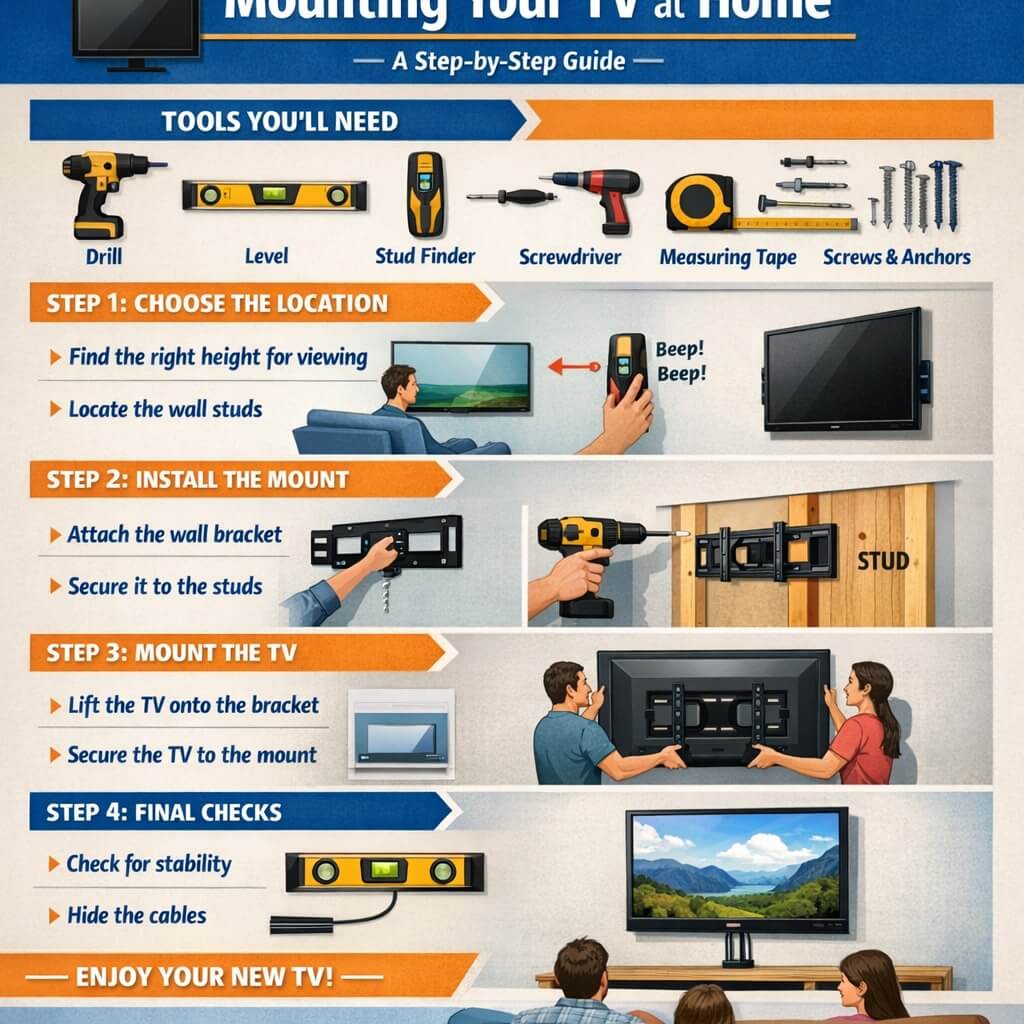
Once you have selected your mount and identified the ideal location, the actual mounting process demands meticulous attention to detail. I always start by using my stud finder to locate the exact center of two wooden studs within the wall. Mark the edges of each stud with a pencil, and then use a level to draw a horizontal line between them at your chosen height. The mounting bracket must be attached to these studs using the provided lag bolts. I cannot overstate the importance of this step. Using drywall anchors alone, even heavy-duty ones, is insufficient for the weight of a modern television. I have witnessed mounts pull out of drywall, destroying the wall and the television. If your studs are not spaced at 16 or 24 inches on center, you may need to install a plywood backing plate between the studs to create a secure mounting surface.
Before drilling pilot holes, I double-check the bracket’s level. A television that is even slightly crooked will be immediately noticeable and distracting. I use a 24-inch level placed along the top edge of the bracket, adjusting until the bubble is perfectly centered. Once level, I mark the pilot hole locations through the bracket’s mounting slots. I then drill pilot holes into the center of the studs using a drill bit slightly smaller than the diameter of the lag bolts. This prevents the wood from splitting while ensuring the bolts grip firmly. After drilling, I clean any dust from the holes and then attach the bracket to the wall using the lag bolts. I tighten them with a socket wrench, applying firm, even pressure until the bracket is flush against the wall. I never use a power drill for this final tightening, as it can easily strip the bolt head or over-torque the connection.
With the wall bracket securely installed, I turn my attention to the television itself. Most mounts require attaching a pair of rails or a bracket to the back of the TV. I lay the television face down on a soft, clean blanket or a dedicated TV assembly mat to protect the screen from scratches. I then align the mounting rails with the VESA holes on the back of the TV, using the provided screws and spacers. Spacers are crucial for televisions with curved backs or recessed VESA patterns, as they ensure the rails sit flat and secure. I hand-tighten all screws first to ensure proper alignment, then use a screwdriver to fully tighten them. I always check the manufacturer’s instructions for the correct torque specification, as over-tightening can damage the television’s chassis. Once the rails are secure, I lift the television with my helper and carefully hook it onto the wall bracket. Most mounts use a simple latching mechanism that clicks into place. I give the TV a gentle tug to confirm it is locked securely before releasing it. This entire process, when done methodically, results in a TV wall mounting that is both safe and reliable.
Concealing Wires and Cables Effectively
A beautifully mounted television loses its visual appeal when a tangle of cables hangs beneath it. Effective cable management is the hallmark of a professional TV installation. I have developed several strategies for concealing wires, each suited to different wall types and homeowner preferences. The most aesthetically pleasing method is to run cables inside the wall. This requires cutting two small access holes: one behind the television and one near the floor or behind your media console. I use a drywall saw to cut a rectangular hole that aligns with the in-wall cable management kit I have chosen. These kits typically include a pair of low-voltage brackets and a faceplate with a brush opening or a snap-in cover. I feed a fish tape from the bottom hole up to the top hole, then attach the cables to the tape and pull them through. This method keeps all wires completely hidden and creates a museum-quality look.
Before running cables inside a wall, I must caution you about local building codes and fire safety regulations. Many